Build a durable incident-response agent with Agentspan
If software is eating the world, then AI agents are starting to eat software. But unfortunately for agentic workflows, production failures are especially ugly and amplify any brittleness in distributed systems.
For example, if an agent reaches for a critical tool, and the process behind that tool is unavailable, the whole workflow can silently fail. And it can be extraordinarily difficult to pinpoint whether the run is gone, duplicated, stuck forever, or, ideally, durably waiting for the dependency to come back.
The goal of this piece is to establish such durability among your AI agents using Agentspan, a new agent orchestration toolbox.
The tutorial will have you deploy the Agentspan platform with Docker Compose, write a small incident-triage agent in Python, run its tool in a separate worker process, kill that process, and then prove from both the terminal and the UI that the same run survives and finishes after the worker returns.
What we ultimately want to see is the following: if a tool worker goes away, the same execution stays durable and completes when the worker comes back.
What we are building
Our demo agent plays the role of an incident commander for a fictional e-commerce backend called checkout-api. The agent is designed to execute the following workflow, and execute it well:
- call a tool named
fetch_incident_context - inspect deploy correlation and customer-impact signals
- return a short summary and next steps
The interesting part is the split of responsibilities:
- the model decides that it needs the tool
- Agentspan records the run and schedules the tool call on the server
- a separate tool worker process executes that tool
If the worker disappears, the run should not.
How to read this tutorial
There are three surfaces in play:
- Python SDK: where you define the agent and the external tool contract
- CLI / terminal: where you prove the run is still alive and inspect the same execution ID
- UI: where you confirm the run is a first-class managed execution and inspect the same execution history
Step 1: Deploy Agentspan with Docker Compose
Start by cloning the repo and exporting your model key once. Here we’re using OpenAI. If you are using a different AI provider (or a self-managed one), refer to the Agentspan documentation.
git clone https://github.com/agentspan-ai/agentspan.git
cd agentspan
git checkout v0.0.12
export OPENAI_API_KEY=your_key_here
Now create a small Compose file that runs the Agentspan Docker stack:
# compose.release.yml
services:
  agentspan:
    image: agentspan/server:0.0.12
    restart: unless-stopped
    ports:
      - "6767:6767"
    extra_hosts:
      - "host.docker.internal:host-gateway"
    environment:
      OPENAI_API_KEY: ${OPENAI_API_KEY}
      JAVA_TOOL_OPTIONS: -Xms512m -Xmx1536m -XX:+UseG1GC -XX:MaxGCPauseMillis=200
      LOGGING_LEVEL_ROOT: WARN
      LOGGING_LEVEL_DEV_AGENTSPAN: INFO
Bring up the Agentspan runtime:
docker compose -f compose.release.yml up -d
Validate that the platform is healthy:
docker compose -f compose.release.yml ps
docker compose -f compose.release.yml logs --tail=120 agentspan
curl -fsS http://localhost:6767/actuator/health
The health response should show:
{"status":"UP"}
At this point you have a local Agentspan stack on http://localhost
.Two details matter here:
- We are using the published Agentspan Docker image, pinned to the same release as the SDK.
- The Agentspan stack ships with a default SQLite database, which we use here. For using and scaling external database services, I recommend exploring the Agentspan helm chart.
Step 2: Create a Python workspace for the demo
From the repo root, create a clean Python environment and install dependencies.
mkdir -p tutorial-demo
cd tutorial-demo
python3 -m venv .venv
source .venv/bin/activate
python -m pip install --upgrade pip
pip install -e ../sdk/python pyyaml
Now set two URLs, one for the SDK and one for the CLI. The Python SDK talks to the API base URL at /api, and the CLI expects the server root and appends /api/… internally
export AGENTSPAN_SERVER_URL=http://localhost:6767/api
export AGENTSPAN_CLI_URL=http://localhost:6767
Step 3: Write the agent!
Create incident_agent.py:
from __future__ import annotations

from pathlib import Path

from agentspan.agents import Agent, AgentRuntime, tool


# Demo convenience only: we persist the execution ID so a second terminal can
# inspect the same run without copy-pasting.
EXECUTION_FILE = Path("/tmp/agentspan_incident_triage.execution_id")

PROMPT = (
    "SEV-2 production incident. checkout-api started failing after a deploy. "
    "Use fetch_incident_context to confirm the blast radius and recommend the safest next action."
)


@tool(external=True)
def fetch_incident_context(service: str, window_minutes: int = 15) -> dict:
    """Fetch deploy correlation and customer-impact context for an incident."""
    ...


agent = Agent(
    name="incident_triage",
    model="openai/gpt-4o-mini",
    tools=[fetch_incident_context],
    instructions=(
        "You are a production incident commander. "
        "Call fetch_incident_context exactly once. "
        'Reply with two short lines: "summary:" and "next_action:".'
    ),
)


def main() -> None:
    runtime = AgentRuntime()
    runtime.deploy(agent)
    handle = runtime.start("incident_triage", PROMPT)
    EXECUTION_FILE.write_text(handle.execution_id + "\n", encoding="utf-8")
    print(f"execution_id={handle.execution_id}")


if __name__ == "__main__":
    main()
Two important notes hidden in this file:
@tool(external=True)means the tool call is scheduled as external work instead of running inline in the submitting Python process- Saving
EXECUTION_FILEis just demo plumbing so another terminal can inspect the same run by ID
Step 4: Write the tool worker process
Now create incident_worker.py. This file is the real failure boundary.
When this process is unavailable, the tool implementation is unavailable. The question Agentspan has to answer is: what happens to the run?
#!/usr/bin/env python3
import argparse
import json
import logging
import os
import signal
import time
from datetime import UTC, datetime
from pathlib import Path

from conductor.client.automator.task_handler import TaskHandler
from conductor.client.configuration.configuration import Configuration
from conductor.client.worker.worker_task import worker_task


TASK_NAME = "fetch_incident_context"

# Demo convenience only: we store the worker PID and process group ID so a
# second terminal can stop or inspect the worker cleanly.
WORKER_INFO_FILE = Path("/tmp/agentspan_incident_triage.worker.json")


def now_iso() -> str:
    return datetime.now(UTC).isoformat()


def save_json(path: Path, payload: dict) -> None:
    path.write_text(json.dumps(payload, indent=2) + "\\n", encoding="utf-8")


def load_json(path: Path) -> dict:
    if not path.exists():
        return {}
    return json.loads(path.read_text(encoding="utf-8"))


def configure_logging() -> None:
    logging.disable(logging.CRITICAL)
    logging.getLogger("conductor.client").setLevel(logging.ERROR)
    logging.getLogger("urllib3").setLevel(logging.WARNING)


@worker_task(task_definition_name=TASK_NAME, register_task_def=True)
def fetch_incident_context_worker(service: str, window_minutes: int = 15) -> dict:
    return {
        "service": service,
        "window_minutes": int(window_minutes),
        "severity": "sev2",
        "error_rate_pct": 18.4,
        "p95_latency_ms": 4210,
        "conversion_drop_pct": 31,
        "recent_deploy_id": "dpl-481",
        "deploy_author": "jchen",
        "deploy_age_minutes": 14,
        "top_signal": "5xx spike started 3 minutes after dpl-481 reached 100% traffic",
        "recommended_action": "rollback dpl-481, freeze the rollout, and watch errors for 10 minutes",
    }


def run_worker() -> None:
    configure_logging()
    try:
        os.setsid()
    except OSError:
        pass
    save_json(
        WORKER_INFO_FILE,
        {
            "pid": os.getpid(),
            "pgid": os.getpgid(0),
            "started_at": now_iso(),
            "task_definition_name": TASK_NAME,
        },
    )
    handler = TaskHandler(
        workers=[],
        configuration=Configuration(
            server_api_url=os.environ.get("AGENTSPAN_SERVER_URL", "http://localhost:6767/api")
        ),
        scan_for_annotated_workers=True,
        monitor_processes=False,
    )
    handler.start_processes()
    print(f"worker_state=ready pid={os.getpid()} task={TASK_NAME}", flush=True)
    try:
        while True:
            time.sleep(1)
    except KeyboardInterrupt:
        handler.stop_processes()


def kill_worker() -> None:
    info = load_json(WORKER_INFO_FILE)
    pgid = int(info["pgid"])
    print(f"sent_signal=SIGKILL worker_pgid={pgid}", flush=True)
    os.killpg(pgid, signal.SIGKILL)


def worker_status() -> None:
    info = load_json(WORKER_INFO_FILE)
    if not info:
        print(f"worker_state=stopped task={TASK_NAME}")
        return
    pid = int(info["pid"])
    try:
        os.kill(pid, 0)
    except OSError:
        print(f"worker_state=stopped task={TASK_NAME}")
        return
    print(
        f"worker_state=ready pid={pid} pgid={info['pgid']} task={info['task_definition_name']}",
        flush=True,
    )


def parse_args() -> argparse.Namespace:
    parser = argparse.ArgumentParser()
    sub = parser.add_subparsers(dest="command", required=True)
    sub.add_parser("run")
    sub.add_parser("kill")
    sub.add_parser("status")
    return parser.parse_args()


if __name__ == "__main__":
    args = parse_args()
    if args.command == "run":
        run_worker()
    elif args.command == "kill":
        kill_worker()
    elif args.command == "status":
        worker_status()
Step 5: Start the worker, kill it, and start the run
Open two terminals in tutorial-demo/.
Terminal A: start the tool worker
source .venv/bin/activate
python incident_worker.py run
Expected output:
worker_state=ready pid=12345 task=fetch_incident_context
Leave this terminal open. It represents the external tool process your agent depends on.
Terminal B: kill the worker and start the run anyway
In a second terminal, activate the same environment:
cd tutorial-demo
source .venv/bin/activate
Now simulate the outage:
python incident_worker.py kill
python incident_worker.py status
Expected output:
sent_signal=SIGKILL worker_pgid=12345
worker_state=stopped task=fetch_incident_context
Now start the run while the tool worker is down:
python incident_agent.py
export EXEC_ID="$(tr -d '\n' < /tmp/agentspan_incident_triage.execution_id)"
echo "$EXEC_ID"
Expected output:
execution_id=xxxxxxxx-xxxx-xxxx-xxxx-xxxxxxxxxxxx
That execution ID is the thing to keep your eye on for the rest of the tutorial.
If Agentspan is doing its job, everything that follows will be about that same ID.
Step 6: Prove from the CLI that the run is durable
The first proof should come from Agentspan’s own CLI.
Ask the runtime for the detailed status of the execution:
agentspan --server http://localhost:6767 agent status "$EXEC_ID"
If you run that command immediately, you may still catch the run while it is transitioning between steps. Run it again after a couple of seconds until the important fields become:
- Execution: the same execution ID
- Status: RUNNING
- Current Task showing whatever step the runtime is currently blocked on
That tells you something important and concrete:
- the run still exists
- the run has not restarted from zero
- the same execution is still alive while the tool worker is unavailable
- Agentspan has kept the run on the server instead of losing it with the worker process
Step 7: Bring the worker back and finish the same run
Go back to Terminal A and restart the tool worker:
python incident_worker.py run
You should see the worker come back and process the queued task:
worker_state=ready pid=23456 task=fetch_incident_context
Back in Terminal B, check the same execution again:
agentspan --server http://localhost:6767 agent status "$EXEC_ID"
This time you should see:
- the same execution ID
- Status: COMPLETED
- the final output containing
summary:andnext_action:
This is critical! The same run you started while the dependency was unavailable is the run that completed.
Step 8: Open the same run in the UI
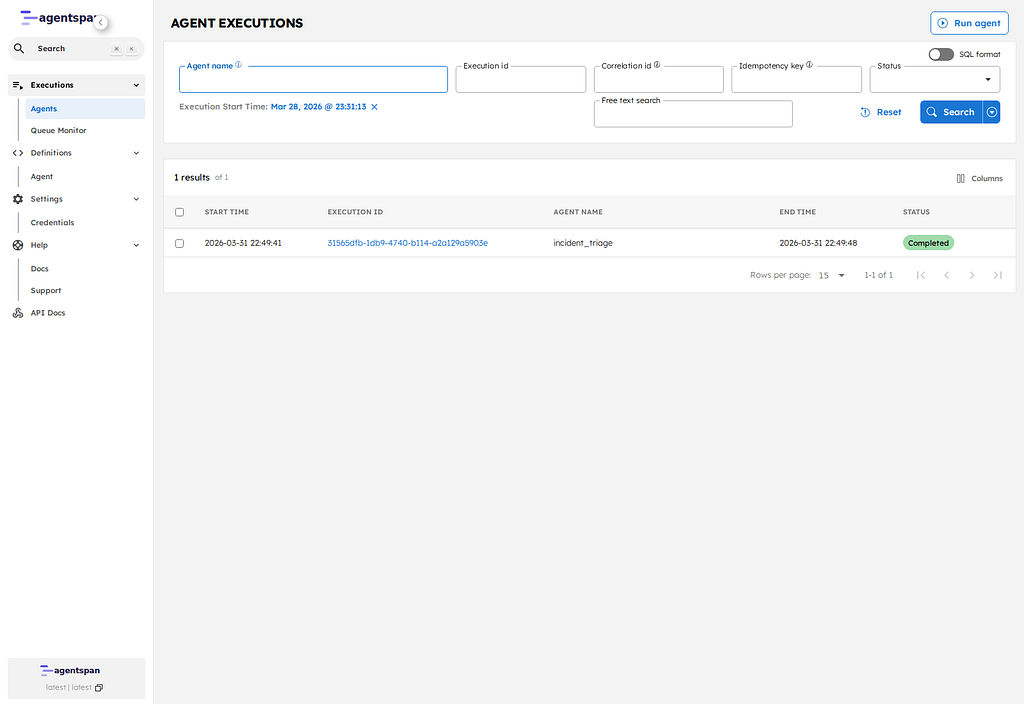
Now switch to the browser and open the execution list:
http://localhost:6767/executions
Find the row for your execution ID and click it. That opens the execution detail page at:
http://localhost:6767/execution/YOUR_EXECUTION_ID
It is a managed execution with a durable ID, a workflow type, timestamps, and a terminal state recorded by the platform.
On this page, check three things:
- the execution ID matches the one from the terminal
- the execution status is now Completed
- the execution detail tabs give you a durable record of the run inside the product UI
The same execution ID that survived the outage is visible in Agentspan, and the execution detail page is where you inspect that run after the fact.
The Timeline view shows how the execution actually moved through the system displaying the order and duration of each step: the initial LLM call, the tool dispatch, the fork into the external tool work, and the continuation of the run after that work completes.

We can overall see that:
- the run is a first-class execution in the platform
- the execution detail is attached to that run
- the durable run is inspectable in the UI
What happened under the hood
Here is ultimately what took place:
- the model decided it needed
fetch_incident_context - Agentspan scheduled that tool call as durable server-side work
- no worker process was available to execute it
- the run stayed alive and the tool task remained schedulable
- the worker came back
- the same run picked up where it left off and completed
That is, your run does not disappear just because the tool worker does.
We’ve proved something narrow but important: when an agent depends on an external tool worker, losing that worker does not mean losing the run. Agentspan keeps the execution durable on the server, preserves the execution ID, and lets the same run continue when the worker comes back.
We’re iterating on the Agentspan project every day. Check out (and please star!) our GitHub project. Check out the docs for more examples. And consider joining our fledgling Discord community where we can build the future of agent orchestration together.