From Support Ticket to Resolution: Build a Sequential AI Agent Pipeline
This is Part 1 of an 8-part series covering every multi-agent strategy in Agentspan. Today, we will cover the sequential pipeline with the >> operator.
What is Agentspan
Agentspan is an orchestration layer for building, bringing, and observing AI agents as durable workflows.
-
Build: define agents with the Agentspan SDK using Agent, @tool, and 8 multi-agent strategies. Compiles to server-side workflows that survive crashes.
-
Bring: already using an agent framework such as LangGraph, OpenAI Agents SDK, or Google ADK. Pass your agents directly to run(). Agentspan adds durability and orchestration on top.
-
Observe: every execution is inspectable in the dashboard. See agent flows, inputs/outputs, tool calls, and token usage. Debug failures, replay runs.
What we are building
Your support queue has 47 tickets. Half are urgent. Your team is triaging by gut feel, writing the same “we are looking into it” response and forgetting to escalate the ones that actually need engineering.
What if every ticket got classified, responded to, and escalation-checked in seconds consistently, every time?
Today, I will show you how to build a support triage pipeline with Agentspan. Three agents, one operator: classify the ticket, draft a response, and decide if engineering needs to get involved. The whole thing runs in seconds, and if your process crashes mid-pipeline, it picks up exactly where it left off.
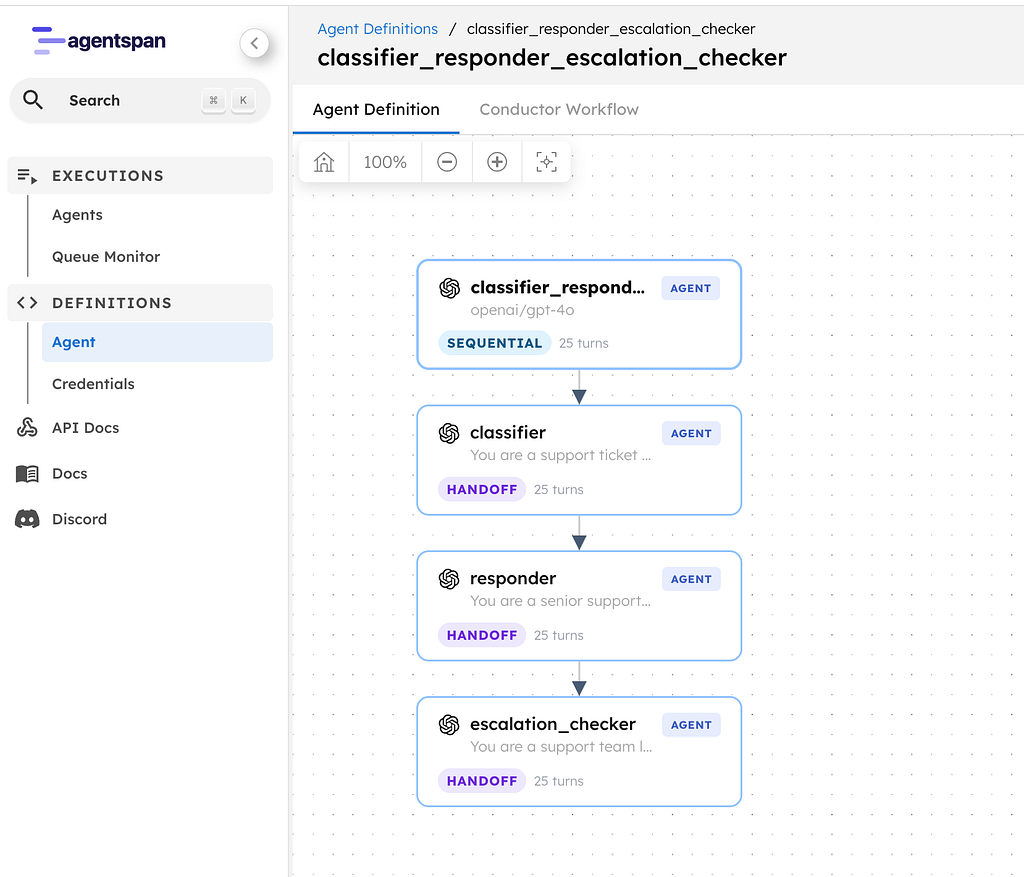
A support triage pipeline with three specialist agents:
- Classifier: reads the ticket and tags priority, category, product area, sentiment, and key facts
- Responder: drafts a reply to post as a comment on the ticket
- Escalation Checker: decides whether engineering needs to be pulled in, and writes an internal note on the ticket if so
Each agent’s output feeds into the next. The classifier informs the responder. The responder and classifier together inform the escalation checker decision.
Ticket → [Classifier] → structured tags → [Responder] → draft reply → [Escalation Checker] → escalate or not
This is the sequential strategy — agents run one after another, each building on the previous agent’s work. In Agentspan, you express this with a single operator: >>.
Setup
Two commands:
pip install agentspan
agentspan server start
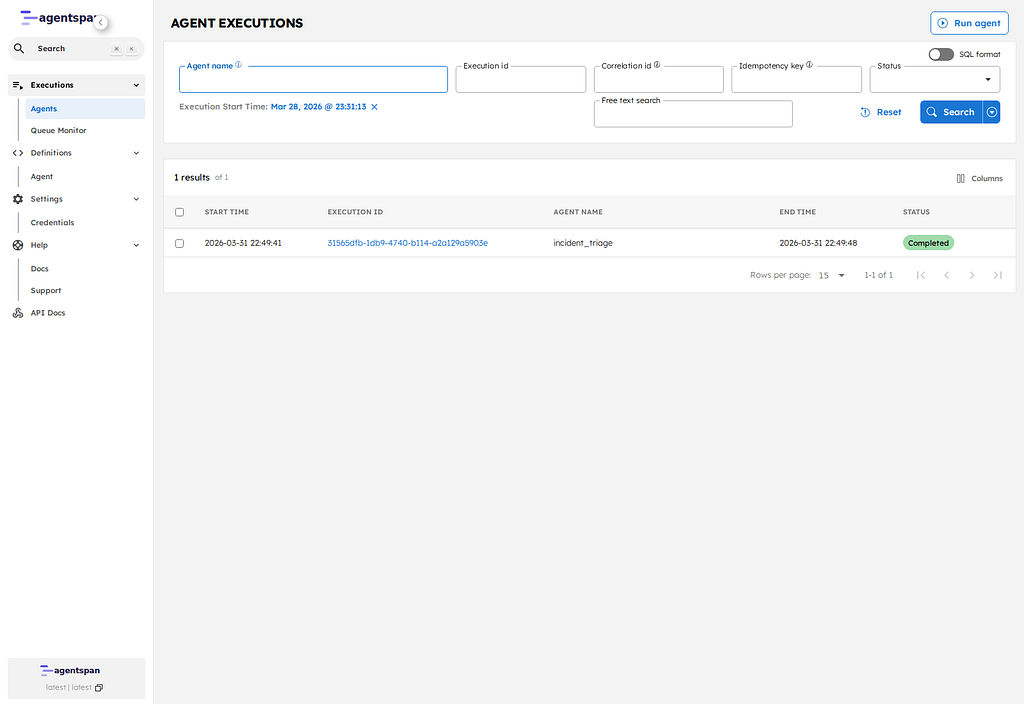
This gives you a local Agentspan server with a visual dashboard at localhost
.Defining the agents
Each agent is an instance of the Agent class with a name, a model, and instructions that define its expertise:
from agentspan.agents import Agent, AgentRuntime


classifier = Agent(
    name="classifier",
    model="openai/gpt-4o",
    instructions=(
        "You are a support ticket classifier. Given a customer support "
        "ticket, produce a structured classification:\n"
        "- Customer: name and company (from the ticket)\n"
        "- Priority: P0 (outage), P1 (critical), P2 (degraded), P3 (minor)\n"
        "- Category: performance, bug, feature-request, billing, onboarding\n"
        "- Product area: which part of the product is affected\n"
        "- Customer sentiment: frustrated, neutral, positive\n"
        "- Key facts: bullet list of the specific issues mentioned\n\n"
        "Be concise and structured. Do not guess - only classify based "
        "on what the customer actually wrote."
    ),
)

responder = Agent(
    name="responder",
    model="openai/gpt-4o",
    instructions=(
        "You are a senior support engineer drafting a response to a "
        "customer. Given the original ticket and the classification, "
        "write a professional reply that:\n"
        "- Acknowledges their issue and urgency\n"
        "- Confirms what you understand the problem to be\n"
        "- Asks specific follow-up questions if anything is unclear\n"
        "- Sets expectations for next steps and timeline\n\n"
        "Be empathetic but not generic. Reference the specific details "
        "they mentioned. Keep it under 200 words."
    ),
)

escalation_checker = Agent(
    name="escalation_checker",
    model="openai/gpt-4o",
    instructions=(
        "You are a support team lead reviewing a ticket for escalation. "
        "Given the original ticket, classification, and draft response, "
        "decide:\n"
        "1. Should this be escalated to engineering? (yes/no)\n"
        "2. Why or why not? (one sentence)\n"
        "3. If yes, write an internal note for the engineering team - "
        "include the customer impact, urgency, and what to investigate.\n"
        "4. If no, confirm the support team can handle it and why.\n\n"
        "Be direct. Engineers are busy - give them only what they need."
    ),
)
Each agent has one job. The classifier doesn’t try to write a response. The responder doesn’t decide on escalation. Separation of concerns — same principle you would use in code.
No tools needed here as these agents are pure LLM reasoning. Their instructions are their expertise.
The >> operator
Here is the entire orchestration logic:
pipeline = classifier >> responder >> escalation_checker
The >> operator chains agents sequentially. The output of each agent becomes the input to the next.
Under the hood, Agentspan compiles this into a durable server-side workflow. It is equivalent to writing:
from agentspan.agents import Strategy


pipeline = Agent(
    name="support_triage",
    agents=[classifier, responder, escalation_checker],
    strategy=Strategy.SEQUENTIAL,
)
The >> operator is shorthand — cleaner to read, identical behavior. Use whichever you prefer.
The ticket
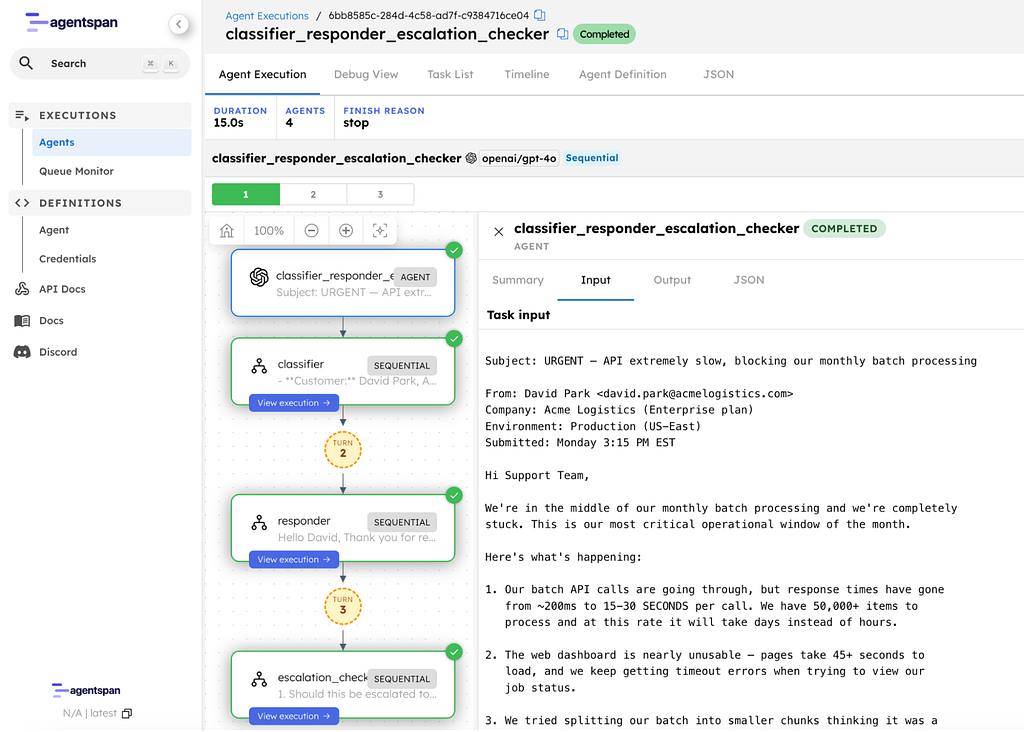
Let’s feed it a realistic support ticket:
ticket = """
Subject: URGENT - API extremely slow, blocking our monthly batch processing
From: David Park <david.park@acmelogistics.com>
Company: Acme Logistics (Enterprise plan)
Environment: Production (US-East)
Submitted: Monday 3:15 PM EST
Hi Support Team,
We're in the middle of our monthly batch processing and we're completely
stuck. This is our most critical operational window of the month.
Here's what's happening:
1. Our batch API calls are going through, but response times have gone
from ~200ms to 15–30 SECONDS per call. We have 50,000+ items to
process and at this rate it will take days instead of hours.
2. The web dashboard is nearly unusable - pages take 45+ seconds to
load, and we keep getting timeout errors when trying to view our
job status.
3. We tried splitting our batch into smaller chunks thinking it was a
rate limit issue, but even individual API calls are slow.
4. Nothing changed on our end - same code, same volume as last month
when everything ran fine in under 2 hours.
We have downstream systems waiting on this data and our SLA with our
own customers is at risk. Three of our team members have been stuck
on this since 1 PM and can't do anything else until it's resolved.
Can someone please look into this ASAP? We need to know:
- Is there a known issue on your end?
- Is there anything we can do to work around it?
- When can we expect normal performance?
Thanks,
David Park
Senior Platform Engineer, Acme Logistics
"""
This is a real-world ticket — an enterprise customer blocked on critical operations, detailed symptoms, clear asks. The kind of ticket that needs fast, accurate handling.
Running the pipeline
with AgentRuntime() as runtime:
    result = runtime.run(pipeline, ticket)
    result.print_result()
AgentRuntime handles everything from compiling the pipeline into a workflow, registering it with the server, starting worker processes, and streaming the result back. One function call.
Let us walk through what each agent produces.
Step 1: Classifier output
The classifier reads the ticket and produces a structured assessment:
- Customer: David Park, Acme Logistics
- Priority: P0 (outage)
- Category: performance
- Product area: API and web dashboard
- Customer sentiment: frustrated
- Key facts:
  - API response times increased from ~200ms to 15–30 seconds.
  - Monthly batch processing is critical and currently blocked.
  - 50,000+ items to process; delays are significant, extending from hours to potential days.
  - Web dashboard is very slow, with page load times of 45+ seconds and frequent timeout errors.
  - Previous code and volume worked without issues last month.
  - Significant impact on internal operations and SLAs with their own customers.
Notice what it did: extracted the customer name, classified the priority, tagged the right product areas, and pulled every specific detail from the ticket. This structured output is exactly what the responder needs.
Step 2: Responder output
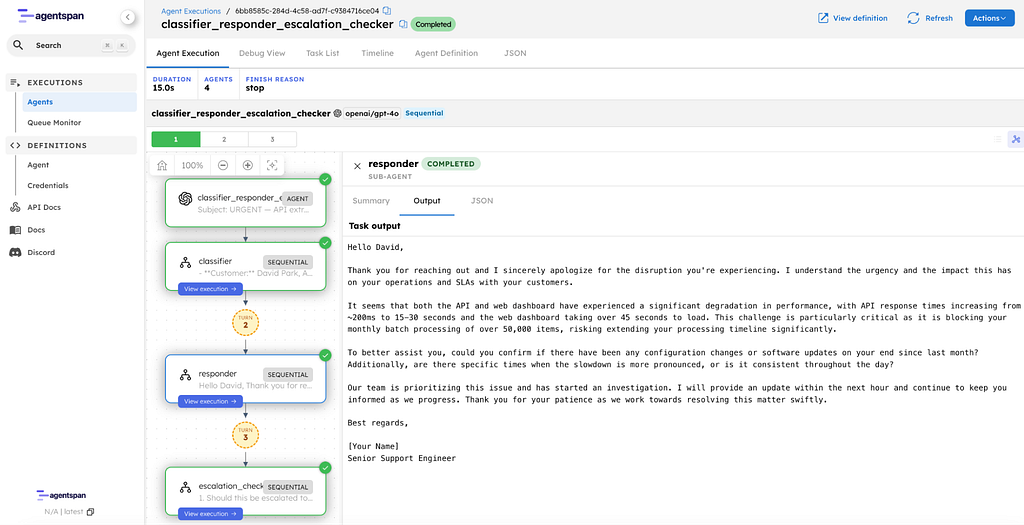
The responder receives the classification (not the raw ticket) and drafts a customer-facing reply:
Hello David,
Thank you for reaching out and I sincerely apologize for the disruption
you're experiencing. I understand the urgency and the impact this has on
your operations and SLAs with your customers.
It seems that both the API and web dashboard have experienced a significant
degradation in performance, with API response times increasing from ~200ms
to 15–30 seconds and the web dashboard taking over 45 seconds to load.
This challenge is particularly critical as it is blocking your monthly
batch processing of over 50,000 items, risking extending your processing
timeline significantly.
To better assist you, could you confirm if there have been any configuration
changes or software updates on your end since last month? Additionally, are
there specific times when the slowdown is more pronounced, or is it
consistent throughout the day?
Our team is prioritizing this issue and has started an investigation. I will
provide an update within the next hour and continue to keep you informed as
we progress. Thank you for your patience as we work towards resolving this
matter swiftly.
Best regards,
[Your Name]
Senior Support Engineer
It addresses David by name, references his exact details of the 200ms-to-30s degradation, the 50K items, the SLA risk. It asks targeted follow-up questions and commits to an update within the hour.
Step 3: Escalation Checker output
The escalation checker reviews everything and makes the call:
1. Should this be escalated to engineering? Yes.
2. Why or why not? The significant performance degradation in both
the API and web dashboard indicates a potential underlying issue
that requires technical investigation by engineering.
3. Internal Note for Engineering: The customer is experiencing a
drastic increase in API response times from ~200ms to 15–30 seconds
and web dashboard load times exceeding 45 seconds. This is
critically impacting their monthly batch processing of 50,000
items, threatening their SLAs. Please investigate any potential
backend issues contributing to this performance degradation
urgently.
Direct and actionable. The engineering team gets the customer impact, the numbers, and what to investigate.
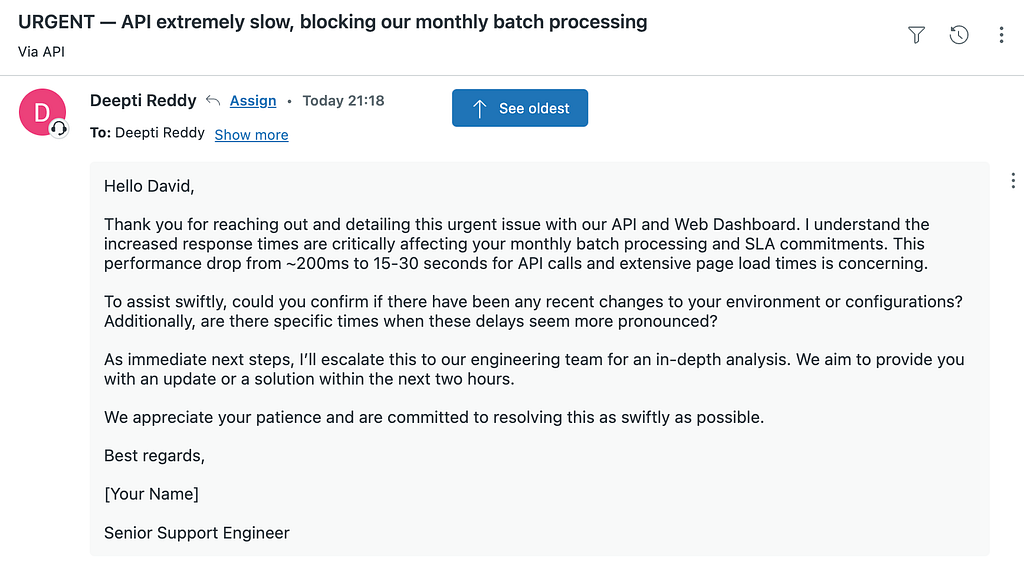
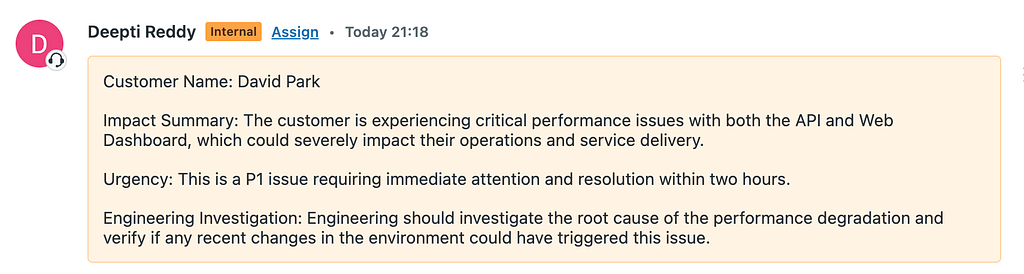
In production, the responder’s output would be posted as a public comment on the ticket — the customer sees it in their thread. The escalation checker’s internal note would be posted as a private note on the same ticket where only your team sees it. We will wire that up in the Zendesk section below. For now, we are just looking at the output.
Three agents, three distinct outputs, each building on the last. The whole pipeline ran in under 30 seconds.
How durability works
When you call runtime.run(), Agentspan doesn’t just chain three API calls in your Python process. It compiles the >> pipeline into a durable workflow on the server. The server owns the execution state — your Python process is just a client.
Here is what that means in practice:
- The classifier finishes. Its output is persisted on the server.
- Your laptop crashes.
- You restart your script. Agentspan reconnects to the same execution.
- The pipeline resumes at the responder — the classification is still there.
- No re-processing, no wasted API calls, no lost work.
This is the core difference between Agentspan and chaining API calls in a script. Your support tooling should be as reliable as the SLAs you are trying to meet.
The full code
from agentspan.agents import Agent, AgentRuntime


classifier = Agent(
    name="classifier",
    model="openai/gpt-4o",
    instructions=(
        "You are a support ticket classifier. Given a customer support "
        "ticket, produce a structured classification:\n"
        "- Customer: name and company (from the ticket)\n"
        "- Priority: P0 (outage), P1 (critical), P2 (degraded), P3 (minor)\n"
        "- Category: performance, bug, feature-request, billing, onboarding\n"
        "- Product area: which part of the product is affected\n"
        "- Customer sentiment: frustrated, neutral, positive\n"
        "- Key facts: bullet list of the specific issues mentioned\n\n"
        "Be concise and structured. Do not guess - only classify based "
        "on what the customer actually wrote."
    ),
)

responder = Agent(
    name="responder",
    model="openai/gpt-4o",
    instructions=(
        "You are a senior support engineer drafting a response to a "
        "customer. Given the original ticket and the classification, "
        "write a professional reply that:\n"
        "- Acknowledges their issue and urgency\n"
        "- Confirms what you understand the problem to be\n"
        "- Asks specific follow-up questions if anything is unclear\n"
        "- Sets expectations for next steps and timeline\n\n"
        "Be empathetic but not generic. Reference the specific details "
        "they mentioned. Keep it under 200 words."
    ),
)

escalation_checker = Agent(
    name="escalation_checker",
    model="openai/gpt-4o",
    instructions=(
        "You are a support team lead reviewing a ticket for escalation. "
        "Given the original ticket, classification, and draft response, "
        "decide:\n"
        "1. Should this be escalated to engineering? (yes/no)\n"
        "2. Why or why not? (one sentence)\n"
        "3. If yes, write an internal note for the engineering team - "
        "include the customer impact, urgency, and what to investigate.\n"
        "4. If no, confirm the support team can handle it and why.\n\n"
        "Be direct. Engineers are busy - give them only what they need."
    ),
)

pipeline = classifier >> responder >> escalation_checker

ticket = """
Subject: URGENT - API extremely slow, blocking our monthly batch processing
From: David Park <david.park@acmelogistics.com>
Company: Acme Logistics (Enterprise plan)
Environment: Production (US-East)
Submitted: Monday 3:15 PM EST
Hi Support Team,
We're in the middle of our monthly batch processing and we're completely
stuck. This is our most critical operational window of the month.
Here's what's happening:
1. Our batch API calls are going through, but response times have gone
from ~200ms to 15–30 SECONDS per call. We have 50,000+ items to
process and at this rate it will take days instead of hours.
2. The web dashboard is nearly unusable - pages take 45+ seconds to
load, and we keep getting timeout errors when trying to view our
job status.
3. We tried splitting our batch into smaller chunks thinking it was a
rate limit issue, but even individual API calls are slow.
4. Nothing changed on our end - same code, same volume as last month
when everything ran fine in under 2 hours.
We have downstream systems waiting on this data and our SLA with our
own customers is at risk. Three of our team members have been stuck
on this since 1 PM and can't do anything else until it's resolved.
Can someone please look into this ASAP? We need to know:
- Is there a known issue on your end?
- Is there anything we can do to work around it?
- When can we expect normal performance?
Thanks,
David Park
Senior Platform Engineer, Acme Logistics
"""

with AgentRuntime() as runtime:
    result = runtime.run(pipeline, ticket)
    result.print_result()
Going further: connect to real Zendesk
The hardcoded ticket was fine for learning >>. But in production, you would want the pipeline to read a ticket from Zendesk, post the response as a comment, and add the escalation note end-to-end. Here’s how.
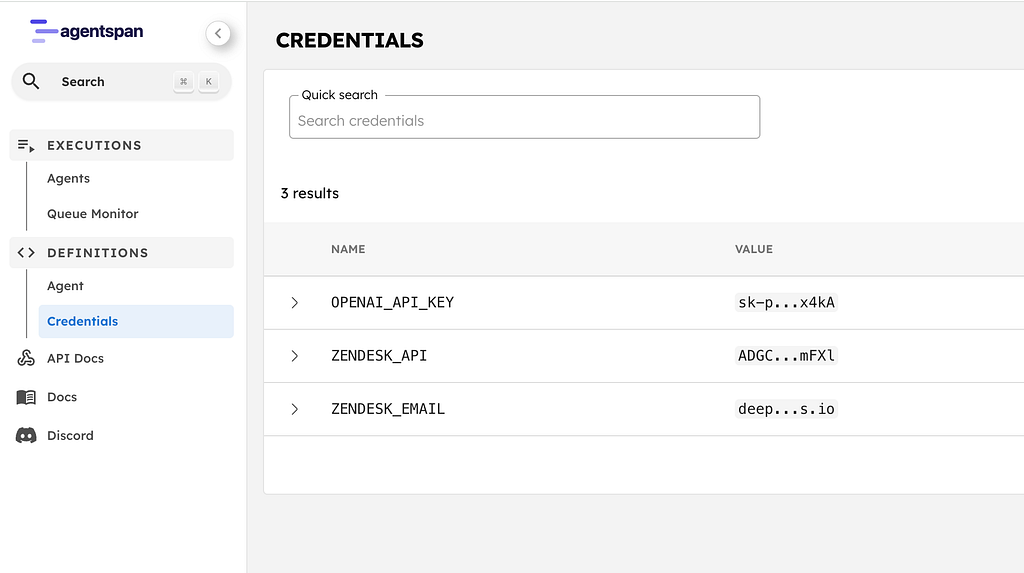
Store your credentials
In the Agentspan dashboard (localhost
), go to Credentials and add:Name Value
──────────────────────────────────────────
ZENDESK_EMAIL Your Zendesk email
ZENDESK_API Your Zendesk API token
The tools
Three tools, one for each stage of the pipeline. Each tool declares which credentials it needs with credentials=[…]. The server fetches them from the credential store and injects them into os.environ when the tool runs:
import os

import requests

from agentspan.agents import tool


ZENDESK_SUBDOMAIN = "yourcompany"


@tool(credentials=["ZENDESK_EMAIL", "ZENDESK_API"])
def get_ticket(ticket_id: int) -> dict:
    """Fetch a support ticket from Zendesk by ID."""
    auth = (f"{os.environ['ZENDESK_EMAIL']}/token", os.environ["ZENDESK_API"])
    resp = requests.get(
        f"https://{ZENDESK_SUBDOMAIN}.zendesk.com/api/v2/tickets/{ticket_id}.json",
        auth=auth,
    )
    ticket = resp.json()["ticket"]
    return {
        "id": ticket["id"],
        "subject": ticket["subject"],
        "description": ticket["description"],
        "status": ticket["status"],
        "priority": ticket["priority"],
        "created_at": ticket["created_at"],
    }


@tool(credentials=["ZENDESK_EMAIL", "ZENDESK_API"])
def reply_to_ticket(ticket_id: int, message: str) -> dict:
    """Post a public comment on a Zendesk ticket. The customer will see this."""
    auth = (f"{os.environ['ZENDESK_EMAIL']}/token", os.environ["ZENDESK_API"])
    resp = requests.put(
        f"https://{ZENDESK_SUBDOMAIN}.zendesk.com/api/v2/tickets/{ticket_id}.json",
        auth=auth,
        json={"ticket": {"comment": {"body": message, "public": True}}},
    )
    return {"status": "posted", "ticket_id": ticket_id}


@tool(credentials=["ZENDESK_EMAIL", "ZENDESK_API"])
def add_internal_note(ticket_id: int, note: str) -> dict:
    """Add a private internal note on a Zendesk ticket. Only your team sees this."""
    auth = (f"{os.environ['ZENDESK_EMAIL']}/token", os.environ["ZENDESK_API"])
    resp = requests.put(
        f"https://{ZENDESK_SUBDOMAIN}.zendesk.com/api/v2/tickets/{ticket_id}.json",
        auth=auth,
        json={"ticket": {"comment": {"body": note, "public": False}}},
    )
    return {"status": "noted", "ticket_id": ticket_id}
Wire them in
Each agent gets the tools it needs:
classifier = Agent(
    name="classifier",
    model="openai/gpt-4o",
    instructions="...",  # same as before
    tools=[get_ticket],
)

responder = Agent(
    name="responder",
    model="openai/gpt-4o",
    instructions=(
        "You are a senior support engineer. Given the classification, "
        "draft a reply and post it as a comment on the ticket using "
        "the reply_to_ticket tool."
    ),
    tools=[reply_to_ticket],
)

escalation_checker = Agent(
    name="escalation_checker",
    model="openai/gpt-4o",
    instructions=(
        "You are a support team lead. Decide if this needs engineering "
        "escalation. If yes, add an internal note on the ticket using "
        "the add_internal_note tool."
    ),
    tools=[add_internal_note],
)

pipeline = classifier >> responder >> escalation_checker

with AgentRuntime() as runtime:
    result = runtime.run(pipeline, "Triage Zendesk ticket #7221")
    result.print_result()
The >> pipeline is identical. The only change is that each agent now has tools to read from and write to Zendesk. The classifier fetches the ticket. The responder posts a public comment — the customer sees it in their ticket thread. The escalation checker adds a private internal note — only your team sees it.
That’s the full loop: ticket comes in, pipeline runs, customer gets a response, engineering gets the escalation note. No human had to copy-paste anything.
Why sequential?
The sequential strategy is the right choice when each agent’s work depends on the previous agent’s output. The responder needs the classification to write a relevant reply. The escalation checker needs both the classification and draft response to make the right call.
But not every problem is sequential. What if you wanted to run the classifier and a sentiment analyzer simultaneously? That’s the parallel multi-agent strategy, and it’s the topic of the next post in this series.
Composability
Want to extend the pipeline? Just add more agents to the chain:
Add a Jira ticket creator:
pipeline = classifier >> responder >> escalation_checker >> jira_agent
Or add a translator for global support teams:
pipeline = classifier >> responder >> escalation_checker >> translator
Same Agent class, same >> operator. The pipeline grows linearly — no new abstractions, no framework boilerplate.
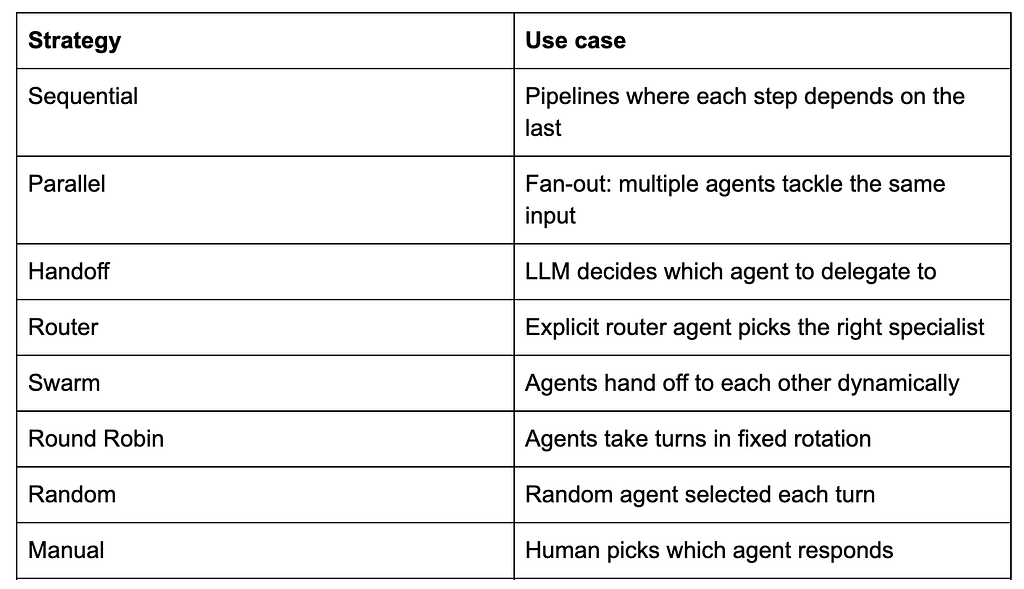
And when you’re ready to go beyond sequential, Agentspan has eight multi-agent strategies, all using the same Agent class:
Try it
pip install agentspan
agentspan server start
- GitHub: github.com/agentspan-ai/agentspan
- Blog examples: github.com/agentspan-ai/agentspan/tree/main/sdk/python/examples/blog_and_videos/sequential_pipeline
- Docs: agentspan.ai/docs
- Discord: https://discord.com/invite/ajcA66JcKq
What’s next
Part 2: The Parallel Strategy — Multiple agents tackle the same input simultaneously, and their results arrive together. Same Agent class, different strategy.