Building a Dependency Review Agent for Release Engineering
Dependency review usually happens at the edge of a release. When a candidate build produces a new lockfile, someone has to answer the same questions again and again: What changed? Which new packages entered the build? Which changes need a closer look?
The repetitive work is usually in the code around the review: parsing manifests, comparing package sets, applying internal policy, and producing a review summary a human can act on.
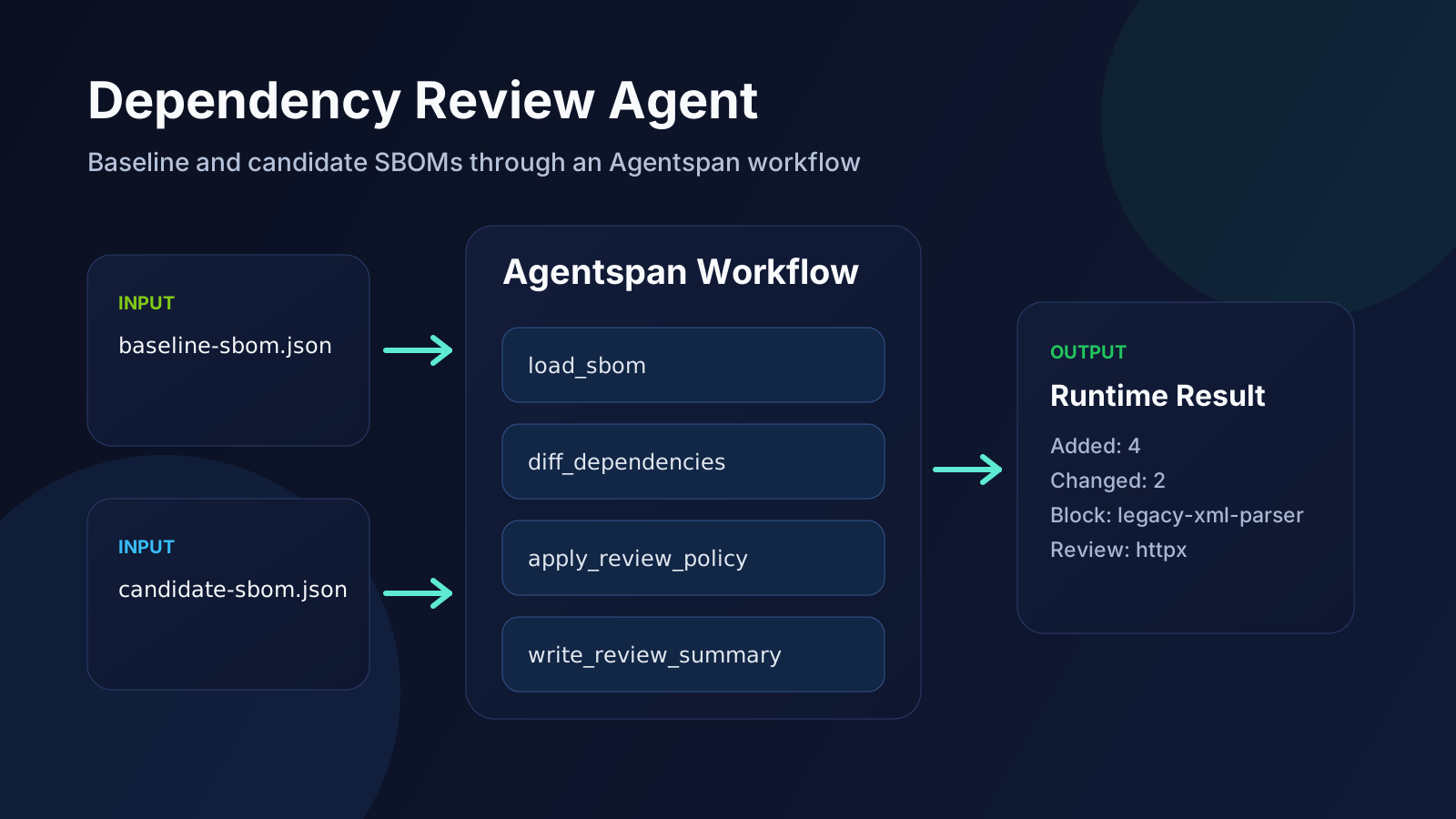
This walkthrough builds a dependency review workflow in Agentspan with custom Python tools. We’ll load two CycloneDX SBOMs, store package data in execution state, compare the baseline and candidate build, apply a local review policy, and return a review summary. The review runs as a durable execution with tool history, execution IDs, and a UI trail that remains available after the run finishes.
What Is Agentspan?
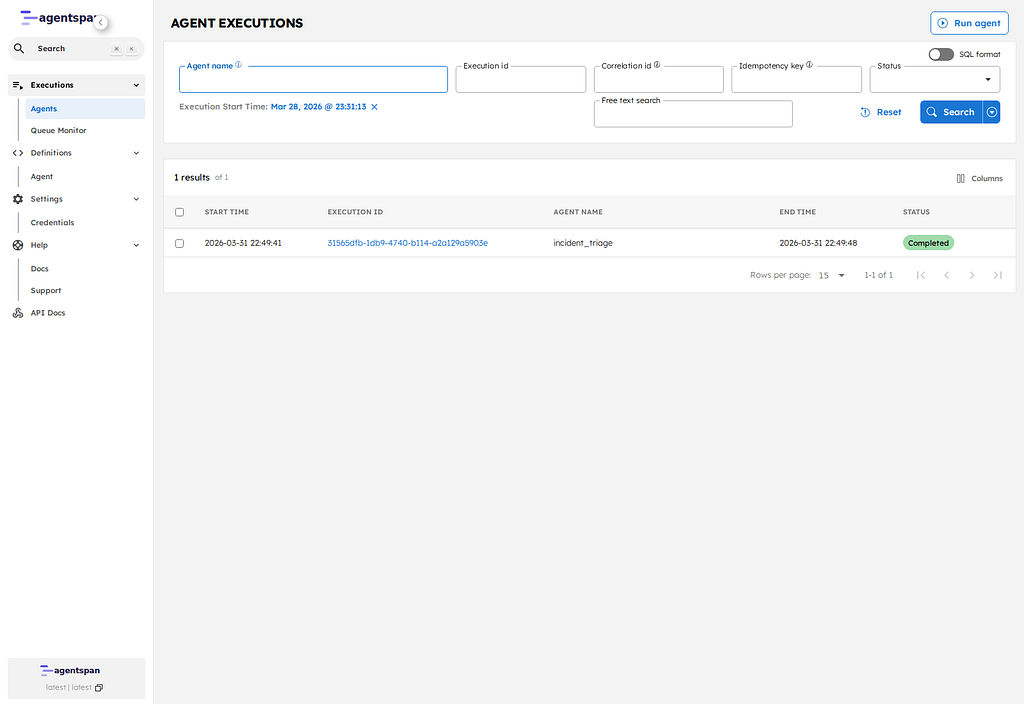
Agentspan is the runtime that executes agent workflows and keeps their state on the server. In practice, that means tool calls, intermediate state, execution IDs, and final outputs are recorded as part of one durable run that you can inspect later in the UI or through the API.
If you are starting from a clean environment, install the Python SDK:
pip install agentspan
Then configure the environment variables for the model provider you want to use by following the providers guide, and start the local server:
agentspan server start
This walkthrough uses the current agentspan.agents Python API and a standard AgentRuntime flow.
What Are Agentspan Tools?
Agentspan currently exposes four main tool patterns:
@toolfor custom Python functionshttp_tool()for a single HTTP endpointapi_tool()for a full OpenAPI, Swagger, or Postman-described APImcp_tool()for tools exposed by an MCP server
This post uses @tool for local Python logic that you own: parsing SBOM documents, diffing package inventories, and applying internal review policy. api_tool() covers operations discovered from an existing API spec, and http_tool() wraps one fixed endpoint.
Custom @tool functions also expose the pieces that matter for this kind of workflow:
- type hints and docstrings become the tool schema the model sees
ToolContext.statelets multiple tool calls share execution-level state- state values stay on the server with the rest of the execution
- the runtime still records every tool step on the server
What We’re Going to Build
We’ll build a workflow that systematically compares a candidate release against a baseline release:
- a baseline CycloneDX SBOM represents what is already in production
- a candidate CycloneDX SBOM represents the new build
- a local policy map flags packages that should be blocked or reviewed
- the agent loads both files, computes the diff, applies policy, and writes a release-review summary
In this workflow, the package parsing and policy logic stay in custom tools. The model decides when to call those tools and how to present the outcome.
Start with a Tool That Loads an SBOM into Execution State
The first Agentspan-specific piece is the @tool decorator. It turns a normal Python function into a runtime tool definition that the agent can call. The second piece is context: ToolContext. When a tool asks for that argument, Agentspan injects execution metadata and a mutable state object for the current run.
This first tool is doing two jobs at once:
- it exposes a normal Python function as part of the agent tool surface
- it stores normalized package data in execution state so later tools can reuse it
import json
from pathlib import Path

from agentspan.agents import ToolContext, tool


@tool
def load_sbom(label: str, path: str, context: ToolContext) -> dict:
    """Load a CycloneDX JSON SBOM and store a normalized package map in execution state."""
    # Read the CycloneDX document from disk inside the tool.
    document = json.loads(Path(path).read_text())
    packages = {}

    for component in document.get("components", []):
        name = component.get("name")
        version = component.get("version")
        if name and version:
            packages[name] = {
                "version": version,
                "purl": component.get("purl"),
                "license": component.get("licenses", []),
            }

    # Agentspan gives each tool access to execution-level state through
    # ToolContext. Save the normalized package map there so later tools can
    # read it from the same execution.
    context.state[f"sbom_{label}"] = json.dumps(packages)
    return {"label": label, "packages_loaded": len(packages)}
That one function shows the core @tool pattern:
- the tool body is ordinary Python
- the runtime still sees a real tool definition with a schema
- the parsed SBOM survives as execution state for later steps
Add a Tool That Compares the Baseline and Candidate
The next tool reads the values written by load_sbom() from context.state. That keeps the tool surface narrow and makes the data flow visible in the execution itself.
In this workflow, one tool writes structured state and the next tool consumes that same state inside the same execution.
@tool
def diff_dependencies(context: ToolContext) -> dict:
    """Compare the baseline and candidate package sets stored in execution state."""
    # Read the two package inventories from execution state that the previous
    # tool populated.
    baseline = json.loads(context.state.get("sbom_baseline", "{}"))
    candidate = json.loads(context.state.get("sbom_candidate", "{}"))

    # Derive the three review buckets from the two package inventories.
    added = sorted(name for name in candidate if name not in baseline)
    removed = sorted(name for name in baseline if name not in candidate)
    changed = {
        name: {"from": baseline[name]["version"], "to": candidate[name]["version"]}
        for name in candidate
        if name in baseline and baseline[name]["version"] != candidate[name]["version"]
    }

    diff = {"added": added, "removed": removed, "changed": changed}

    # Persist the diff so the next tool can apply policy to the same data.
    context.state["dependency_diff"] = json.dumps(diff)
    return diff
The Agentspan behavior here is context.state. The runtime carries that state forward so later tools can keep working on the same execution without you threading every intermediate value through model text.
Apply Local Review Policy in Another Tool
The next step is still ordinary Python, but it is now operating on state that Agentspan is carrying between tool calls. The policy map itself is just local code. What makes it part of the workflow is that @tool exposes the function to the runtime and ToolContext.state gives it the diff from the previous step.
POLICY_DB = {
    "legacy-xml-parser": {
        "decision": "block",
        "reason": "Internal advisory DEP-104 requires removal before release.",
    },
    "httpx": {
        "decision": "review",
        "reason": "New outbound HTTP client; confirm proxy and timeout settings.",
    },
}


@tool
def apply_review_policy(context: ToolContext) -> dict:
    """Flag dependency changes against a local review policy."""
    # Pull the dependency diff and candidate package set from the same
    # execution state the earlier tools wrote.
    diff = json.loads(context.state.get("dependency_diff", "{}"))
    candidate = json.loads(context.state.get("sbom_candidate", "{}"))

    # Evaluate only newly introduced packages against the local review policy.
    findings = []
    for package_name in diff.get("added", []):
        rule = POLICY_DB.get(package_name)
        if not rule:
            continue
        findings.append(
            {
                "package": package_name,
                "version": candidate[package_name]["version"],
                "decision": rule["decision"],
                "reason": rule["reason"],
            }
        )

    # Persist findings for the final summary step.
    context.state["policy_findings"] = json.dumps(findings)
    return {"findings": findings, "total_findings": len(findings)}
At this point the runtime has a clear execution trail:
- one step loaded the baseline SBOM
- one step loaded the candidate SBOM
- one step computed the dependency diff
- this step applied review policy to that diff
Write the Final Review Summary
The last tool turns the accumulated execution state into the final review summary. Keeping that step as a tool makes the whole review process visible inside the runtime and preserves the summary as part of the execution history.
@tool
def write_review_summary(context: ToolContext) -> str:
    """Return a final engineering summary from the accumulated execution state."""
    # Read the state assembled across the earlier tool calls.
    diff = json.loads(context.state.get("dependency_diff", "{}"))
    findings = json.loads(context.state.get("policy_findings", "[]"))

    # Start the summary with the overall dependency counts.
    lines = [
        f"Added packages: {len(diff.get('added', []))}",
        f"Removed packages: {len(diff.get('removed', []))}",
        f"Changed packages: {len(diff.get('changed', {}))}",
    ]

    if findings:
        # Add one line per package that the policy flagged.
        lines.append("Policy findings:")
        for finding in findings:
            lines.append(
                f"- {finding['package']} {finding['version']}: "
                f"{finding['decision']} ({finding['reason']})"
            )
    else:
        lines.append("No policy findings for newly introduced packages.")

    return "\n".join(lines)
At this point the Agentspan-specific structure is clear:
@toolmakes each function part of the runtime tool surfaceToolContext.statelets one step hand structured data to the next- the server keeps the execution history available after the Python process exits
Create the Agentspan Agent
Once the tool surface is defined, the next Agentspan-specific step is the Agent(...) definition. This is where the model, the instructions, and the tool list come together.
In this example, Agentspan gets a concrete runtime definition: a named agent, a model binding, and a fixed set of tools that become part of the execution plan.
from agentspan.agents import Agent


review_agent = Agent(
    name="dependency_review_agent",
    model="openai/gpt-4o-mini",
    instructions=(
        # The instructions specify the tool order so the runtime executes a
        # predictable review flow for this walkthrough.
        "You review release dependencies. Call the tools in this exact order: "
        "1) load_sbom for label baseline and the baseline file path. "
        "2) load_sbom for label candidate and the candidate file path. "
        "3) diff_dependencies with no arguments. "
        "4) apply_review_policy with no arguments. "
        "5) write_review_summary with no arguments. "
        "Return only the summary from write_review_summary."
    ),
    tools=[load_sbom, diff_dependencies, apply_review_policy, write_review_summary],
)
That block gives Agentspan a concrete runtime definition:
- a named agent
- a model binding
- a fixed tool surface
- a repeatable execution plan the runtime can record and inspect later
Run the Agent Through AgentRuntime
The last Agentspan-specific piece is AgentRuntime(). This is the boundary where the run stops being just local Python code and becomes a tracked server-side execution with an execution ID, tool history, and UI record.
from agentspan.agents import AgentRuntime


with AgentRuntime() as runtime:
    result = runtime.run(
        # The task message only supplies the file paths and desired outcome.
        # The agent definition and tool surface above determine how the work
        # executes inside the runtime.
        review_agent,
        "Load baseline from ./data/baseline-sbom.json and candidate from "
        "./data/candidate-sbom.json. Compare them, apply the review policy, "
        "and summarize the release risk.",
    )
This flow was tested against agentspan==0.1.7 on the AWS VM backing the current demo environment. The code is still ordinary Python, but the run is no longer process-local. The execution is compiled to the server, the tool calls are recorded there, and the result comes back with a durable execution ID you can inspect in the UI.
Where @tool Fits in This Workflow
This workflow maps naturally to @tool for three reasons:
- the critical logic is Python code you already own
- the workflow benefits from execution-level state shared across several steps
- the policy data stays in local Python code
It also composes well with the rest of the runtime. If the next step is to open a remediation issue, you can add another custom tool and gate it with approval_required=True. If one review step already runs in another service, you can switch that step to @tool(external=True) and keep the same workflow shape.
Inspect the Result in the Runtime
When this agent runs, the runtime keeps the intermediate tool activity visible alongside the final summary:
- one tool call for each file load
- a diff step that turns the two package sets into added, removed, and changed dependencies
- a policy step that explains why a package was blocked or marked for review
- a final output step that summarizes the release decision
An ad hoc script usually prints a review summary and exits. This execution stays on the server with the same execution ID, task history, and step-level visibility you can use later for debugging or auditability.