Why AI Agents Lose Work When They Crash (and How to Run skills.md Skills Durably)
An AI agent doing useful work almost always requires heavy interaction with other tools. This includes parsing files, calling APIs, drafting documents, and waiting for someone to sign off on the result. Every step accumulates state: what the model decided, what the tools returned, what remains to be done. In most agent frameworks, all of that state lives in the memory of whichever process started the loop. This means the run is exactly as durable as that process.
This post examines that possible failure point with an agent that invokes skills from skills.md, then walks through an integration pattern that removes it. We accomplish this by compiling the agent into a durable, server-side execution with Agentspan.
Why a crash wipes out an agent’s progress
An agent loop is an ordinary OS process. The prompt history, accumulated tool results, and the model’s partial plan are objects in that process’s memory. If, or when, the process dies due to a crash, a deploy, or a closed laptop, everything in memory dies with it. Restarting means truly starting over. Model calls that already succeeded run (and bill) again. Moreover, any approval a human already granted is gone.
Client-side retry loops do not properly address this. A retry wrapper, for example, protects a single call inside a live process. The run is not protected from the death of the process itself. The fix therefore needs to be architectural. We must move execution state out of the launching process entirely.
skills.md is a remote catalog of agent skills
skills.md is a skill catalog for AI agents. It comprises 200+ skills across 17 categories, invoked through a CLI or an MCP server. Free skills such as CSV parsing or format conversion execute locally from a bundled library. Premium skills run hosted and are quoted to you before any money is spent on them. Every invocation produces a run record with an id, status, and artifact paths.
The skills.md skills can be installed with:
npm install -g bun @hasna/skills   # the skills CLI runs on bun
skills list --brief                # 200+ skills; free ones marked (Free)
Skill runs as durable tool tasks
Agentspan is a durable agent runtime framework that deliberately takes the opposite architectural approach from relying on in-process loops. Agents are defined programmatically, but the agent definition compiles into a server-side execution. The server owns the execution graph, the task history, and the run’s status. The processes themselves are clients and workers that can come and go.
Agentspan can be installed a couple of ways. Below shows installing the Python SDK locally from PyPI as well as launching the published Docker container for the server. (Running the server via agentspan server start instead of Docker requires Java 21+.)
pip install agentspan # the Python SDK
docker run -d -p 6767:6767 -e OPENAI_API_KEY=$OPENAI_API_KEY agentspan/server:0.1.10 # Includes a model key passed in as an env var
Once installed, we can wrap the skills.md CLI in @tool functions to turn every skill invocation into a scheduled, recorded task. For example, save the following as incident_pipeline.py:
import json
import subprocess

from agentspan.agents import Agent, tool


def skills_cli(skill: str, args: list[str]) -> dict:
    """Invoke the skills.md CLI and return its JSON run record."""
    proc = subprocess.run(
        ["skills", "run", "--json", skill, "--", *args],
        capture_output=True,
        text=True,
    )
    record = json.loads(proc.stdout)
    if record["exitCode"] != 0:
        raise RuntimeError(f"{skill} failed: {record['stderr']}")
    return record


@tool
def run_skill(skill: str, args: list[str]) -> dict:
    """Run a free skills.md skill, e.g. run_skill('read-csv', ['/data/export.csv'])."""
    return skills_cli(skill, args)


@tool(approval_required=True)
def run_premium_skill(skill: str, args: list[str]) -> dict:
    """Run a skills.md skill that costs money. Pauses for human approval first."""
    return skills_cli(skill, args)
If a skill fails, the wrapper raises and the runtime records a failed, retryable task. A successful run record persists as the task’s output. And the agent itself is a single declaration in the code.
report_agent = Agent(
    name="incident_report_agent",
    model="openai/gpt-5.5",
    tools=[run_skill, run_premium_skill],
    instructions=(
        "You turn incident CSV exports into PDF summary reports. "
        "Step 1: parse the export with run_skill('read-csv', [csv_path]). "
        "Step 2: write a concise markdown summary: incident counts by severity, "
        "the slowest resolution, and one notable pattern. "
        "Step 3: render it with run_skill('pdf-generate', ['--content', markdown]). "
        "Only use run_premium_skill when the request explicitly asks for a premium skill. "
        "Finish by reporting the generated pdfFile path from the tool output."
    ),
)
from agentspan.agents import AgentRuntime

with AgentRuntime(server_url="http://localhost:6767/api") as runtime:
    result = runtime.run(report_agent, "Create a PDF summary report of /data/incidents.csv.")
    print(result.status)            # COMPLETED
    print(result.output["result"])  # path of the generated PDF
On this machine, that run parsed the CSV, drafted a summary, rendered the PDF, and reported its path in 36 seconds and two tool calls. Also worth noting: skills.md exposes its catalog over a stdio MCP server. When a provider offers an HTTP MCP endpoint instead, Agentspan’s mcp_tool() discovers its tools server-side with no wrapper at all.
Surviving a mid-run crash
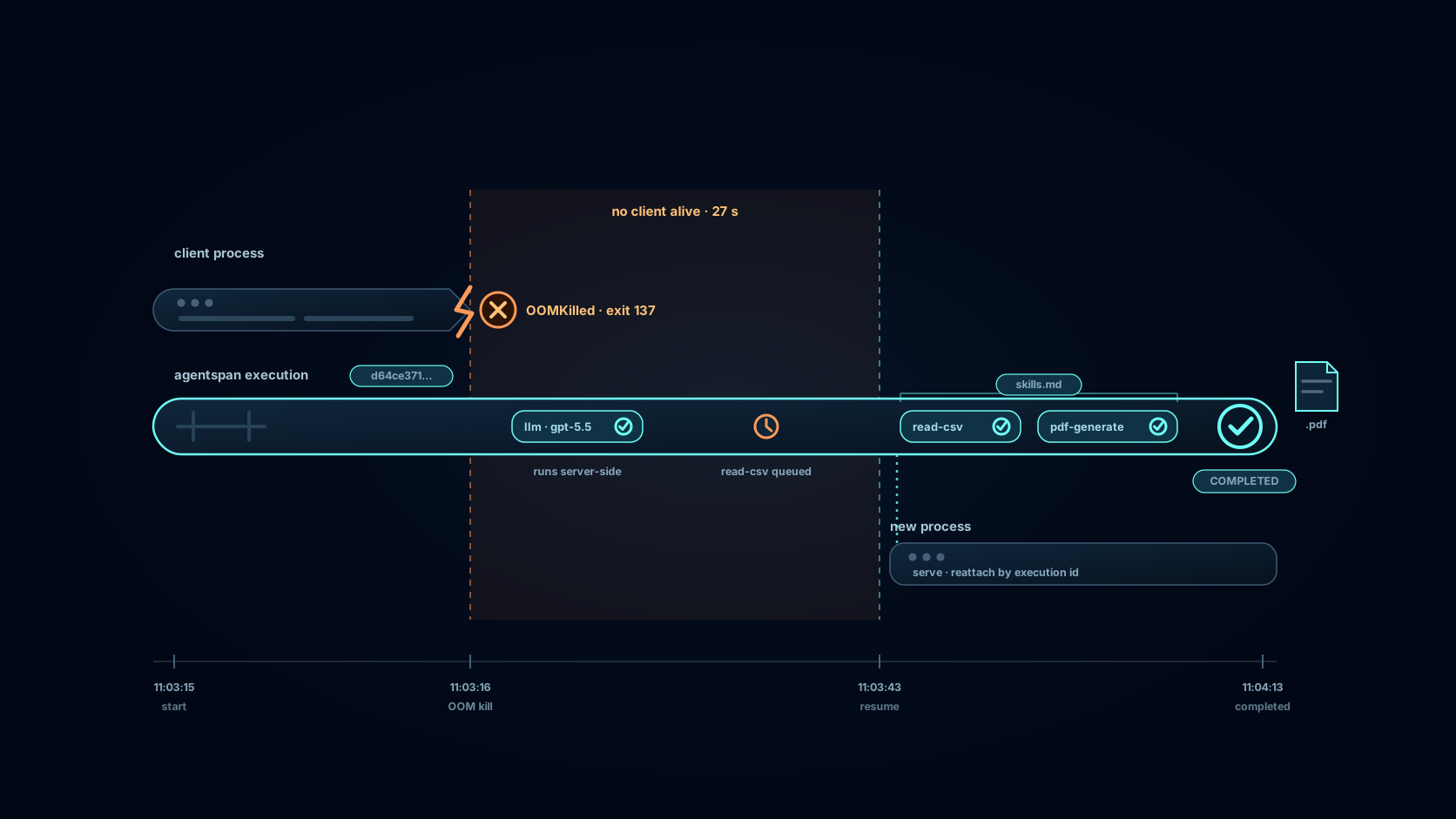
A core test of agent durability is ensuring that the run outlives the process that started it. So let’s see what happens when the agent crashes for real. We stage that by having the client run in a container limited to 384 MB of memory. We then start the run with start() and develop a deliberate memory leak:
from agentspan.agents import AgentRuntime

from incident_pipeline import report_agent

with AgentRuntime(server_url="http://localhost:6767/api") as runtime:
    handle = runtime.start(report_agent, "Create a PDF summary report of /data/incidents.csv.")
    print(handle.execution_id) # In this particular run, execution ID d64ce371-9f14-4bd5-9b72-acc71cc7918e

    hog = []
    while True:  # a memory leak; the kernel ends this process, not us
        hog.append(bytearray(16 * 1024 * 1024))
The kernel’s OOM killer terminated the container — the client and the worker subprocesses that execute the @tool functions, together, with no chance to clean up:
docker inspect --format 'OOMKilled={{.State.OOMKilled}} ExitCode={{.State.ExitCode}}' report-client
# OOMKilled=true ExitCode=137
Asking the server afterwards showed the workflow still RUNNING, with the first run_skill task parked in SCHEDULED: the first model turn had already completed server-side, and the pending tool work was waiting, not lost.
A brand-new process — on the host this time, a different machine from the container’s point of view — reattaches by execution id and finishes the job:
from agentspan.agents import AgentHandle, AgentRuntime

from incident_pipeline import report_agent

with AgentRuntime(server_url="http://localhost:6767/api") as runtime:
    runtime.serve(report_agent, blocking=False)  # workers for the @tool functions
    handle = AgentHandle(
        execution_id="d64ce371-9f14-4bd5-9b72-acc71cc7918e", runtime=runtime
    )
    result = handle.stream().get_result()
    print(result.status)  # Status.COMPLETED
The same execution completed under the same id, the finished model turn was not re-run, and the PDF landed in the skill’s export directory. On the server, the record is indistinguishable from a run that never crashed.
Approval gates for premium skill runs
Premium skills add a second failure mode: spending money without oversight. The pdf-to-markdown skill costs $0.05 a run; transcript costs $0.10. An autonomous retry loop is precisely where a billing surprise comes from.
run_premium_skill above is declared with @tool(approval_required=True). Before its body executes, the runtime parks the execution at an approval gate. The pause is server state rather than a blocked thread, so it holds for days and resolves from any machine:
status = handle.get_status()
if status.is_waiting:        # parked at the approval gate
    handle.approve()         # or handle.reject("over budget")
Reading the execution trail
Every run above has an execution id, and the server UI renders its full history: each model turn, each tool task with its arguments, token counts, duration, and finish reason. The screenshot below is the actual OOM-killed-and-resumed run. Turn one’s read-csv call and turn two’s pdf-generate call are all green under one execution id.
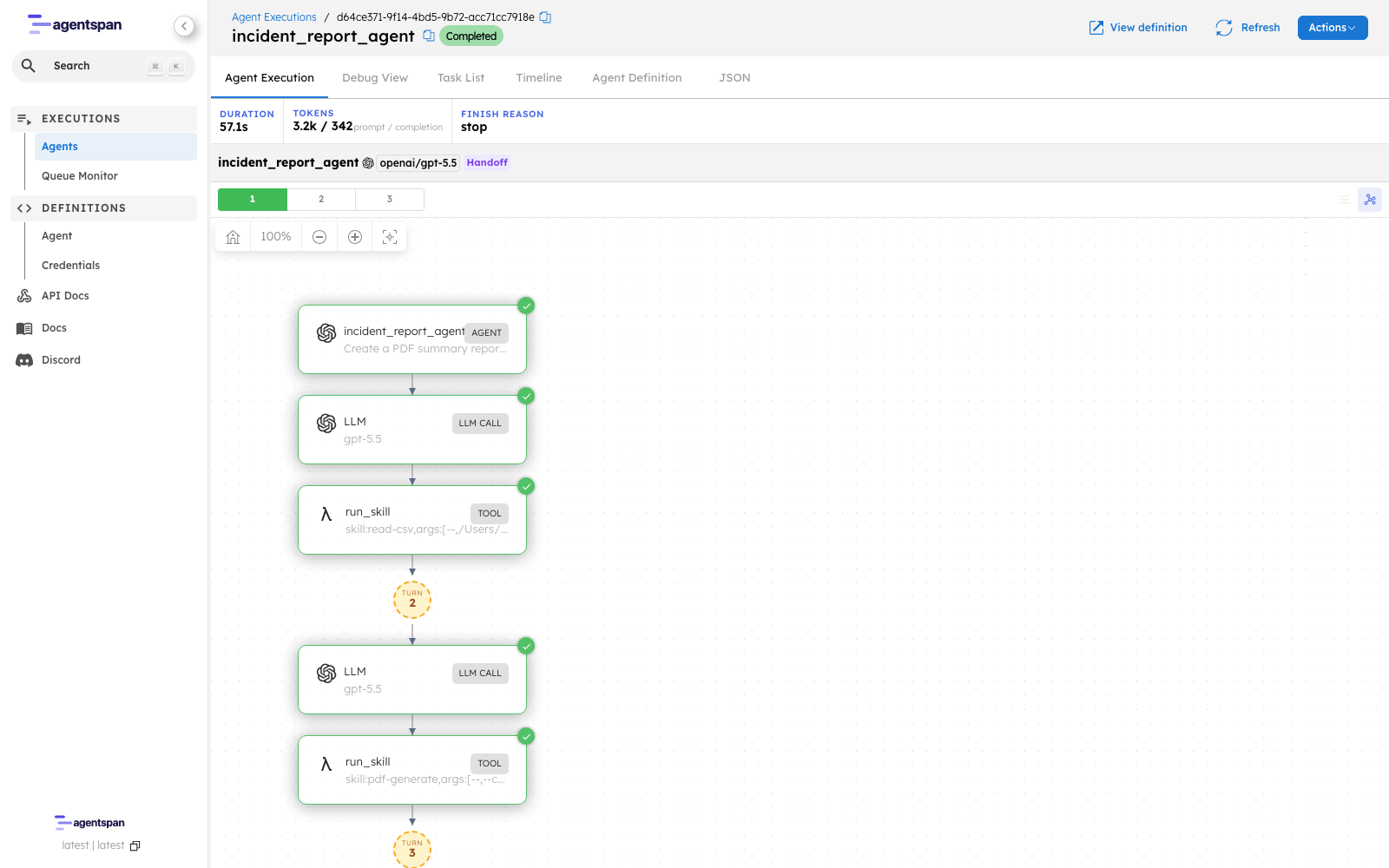
The execution graph for d64ce371, the run whose client the kernel OOM-killed mid-flight and a different machine finished.
The Task List view is where the crash shows up as data. The first run_skill task was scheduled at 11:03
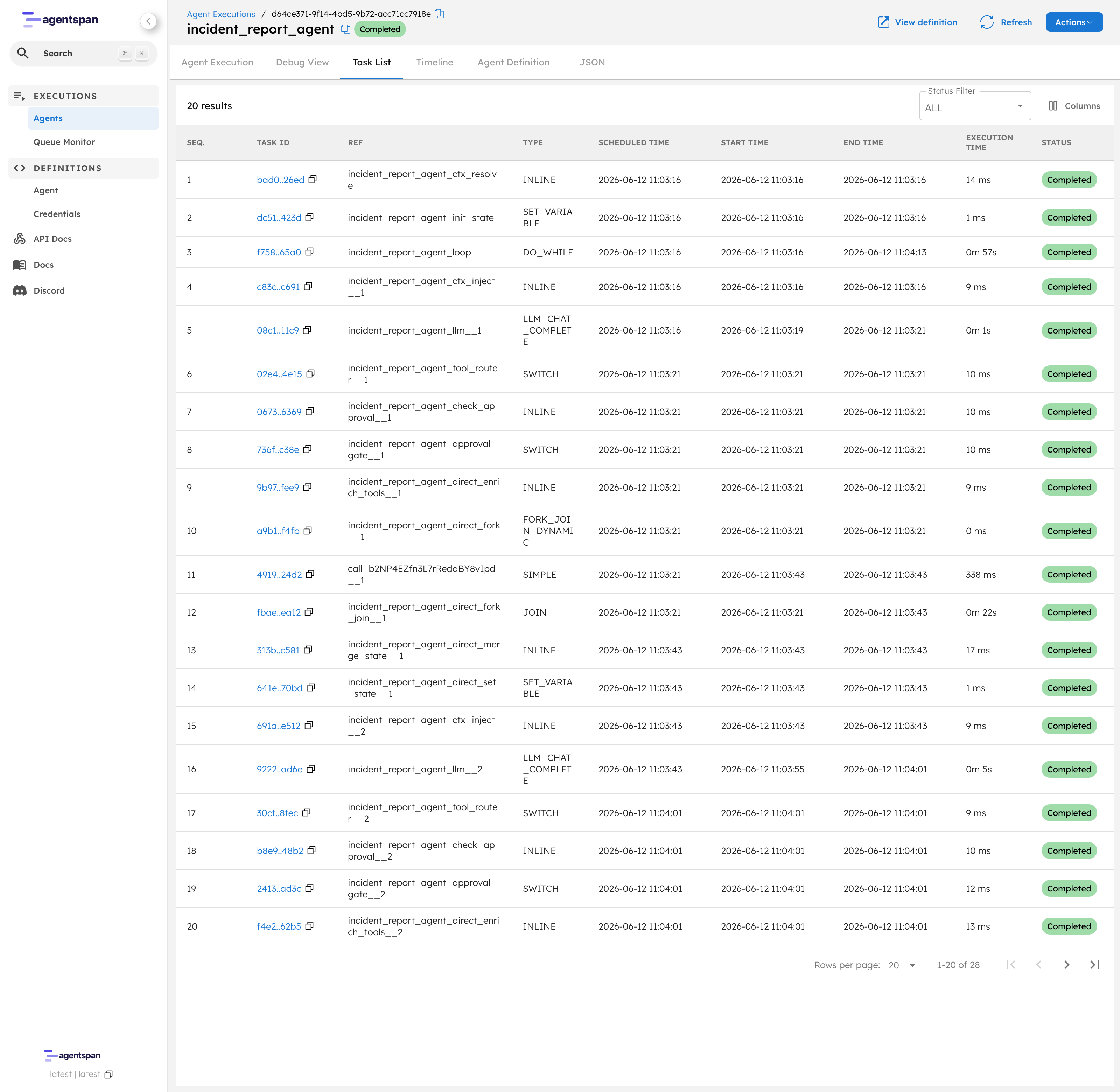
The task trace for the same execution. Row 11 is the skill invocation that waited out the crash; the gap between its scheduled and start times is the window when nothing was alive to run it.
With Agentspan and durable, reusable skills, you have a persistent framework that helps your agents survive the realities and risks of actual production usage.
Next steps
- Get started with Agentspan
- Agentspan tools docs
- Human-in-the-loop example
- Agentspan on GitHub
- skills.md quickstart
- Join the Agentspan Discord community