How to Connect an MCP Server to Your AI Agent (Without Leaking API Keys)
The Model Context Protocol (MCP) is a standard way for a tool to describe itself to an agent. Unfortunately, most of those third-party services sit behind an API key. The moment you wire one of them into an agent, you have to decide where that key lives, and the usual answer is an environment variable read by whatever process runs the agent loop.
That same process logs the model’s inputs and outputs, retries failed steps, and gets copied across every worker you scale to. The key ends up everywhere the agent runs.
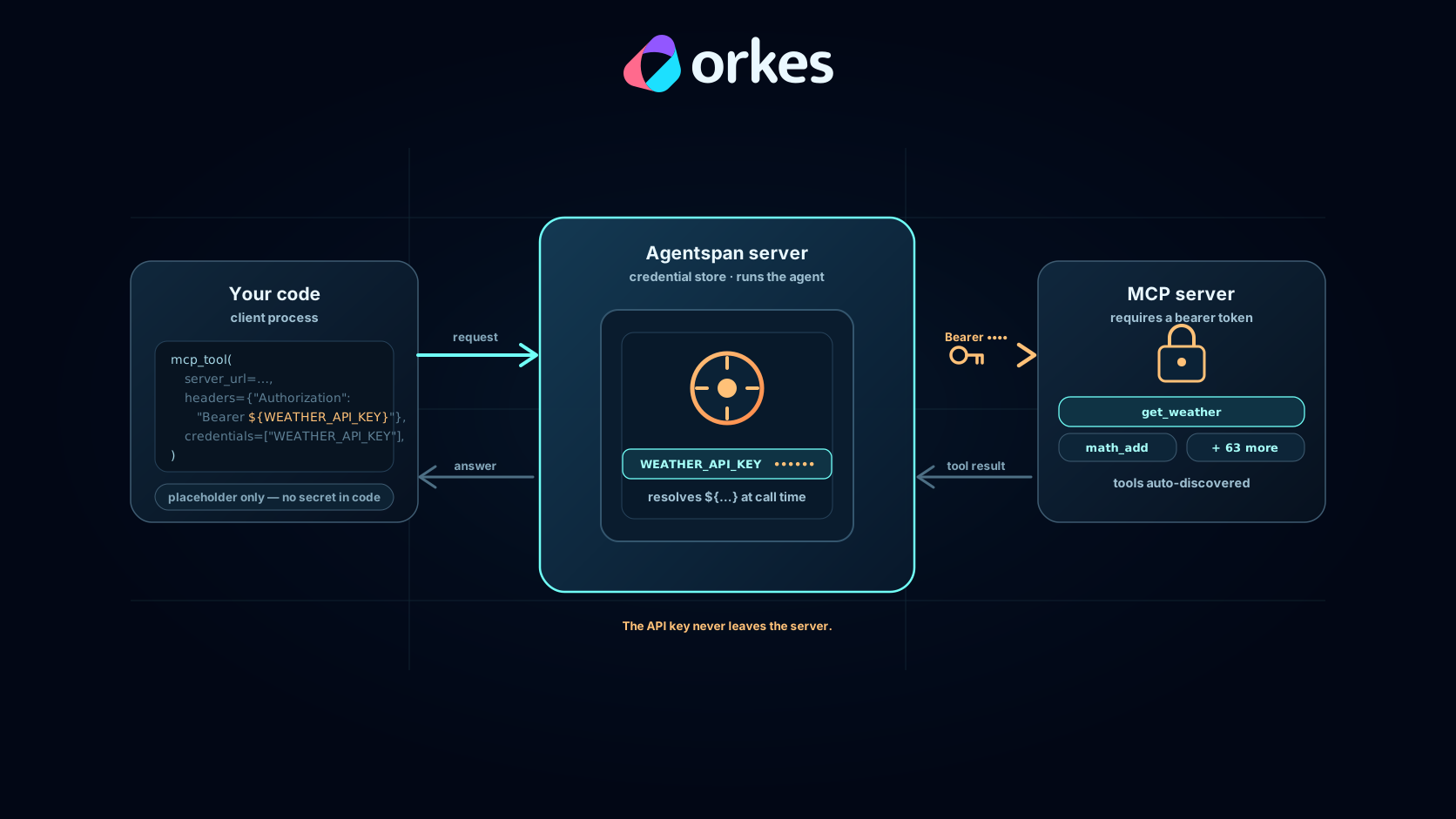
This post connects an MCP server to an agent with Agentspan and keeps the key out of that path. It never enters your code or the agent process, only the server that makes the call.
Why MCP keys are hard to keep contained
An agent that uses tools runs a loop: send the conversation to the model, receive a tool call, run it, append the result, repeat. When the tool is an MCP server behind a bearer token, the token has to be present wherever that loop runs. In a normal setup that means an environment variable in the client and that same variable in every worker that executes tools. Often the token ends up printed into a trace the first time you log an outgoing request to debug it. Rotating the key means hunting down each of those copies. One verbose log line is enough to leak it.
The cause of this is structural. The code that decides to call a tool and the secret that authorizes the call live in the same process. The fix is to separate these concerns.
Connect a server in one call
Agentspan is a runtime for agents. You define an agent programmatically, and the definition compiles to a server-side execution. The server owns the run, the tool calls, and the record of what happened. For MCP that ownership is the useful part, because the server can hold the credential and make the call.
Agentspan uses a primitive called mcp_tool() that points at an MCP endpoint. At compile time Agentspan asks that endpoint for its tool list and turns each tool into one the model can call. The calls run on the Agentspan server, so there is no worker process to stand up.
Let’s test this out. Start by installing Agentspan and a mock MCP server.
pip install agentspan      # the Python SDK
agentspan server start     # runs on localhost:6767 (needs Java 21+)

pip install mcp-testkit    # a local MCP server to test against
mcp-testkit --transport http --port 3001
mcp-testkit is a test MCP server with 65 deterministic tools; get_weather is one of them. Then let’s define an agent and point it at the server:
from agentspan.agents import Agent, AgentRuntime, mcp_tool

# One call wires in every tool the MCP server exposes.
weather = mcp_tool(
    server_url="http://localhost:3001/mcp",
    name="weather",
    description="A weather service exposed over MCP.",
)

agent = Agent(
    name="weather_agent",
    model="openai/gpt-5.5",
    tools=[weather],
    instructions="Answer weather questions with the MCP tools. Give the temperature in Fahrenheit and the condition.",
)

with AgentRuntime(server_url="http://localhost:6767/api") as runtime:
    result = runtime.run(agent, "What's the weather in San Francisco?")
    print(result.output["result"])
The run discovers the server’s tools, the model picks get_weather, and the answer comes back:
The weather in San Francisco is 77°F and sunny.
No worker process ran. Discovery and the tool call both happened on the server, which the execution graph shows directly:
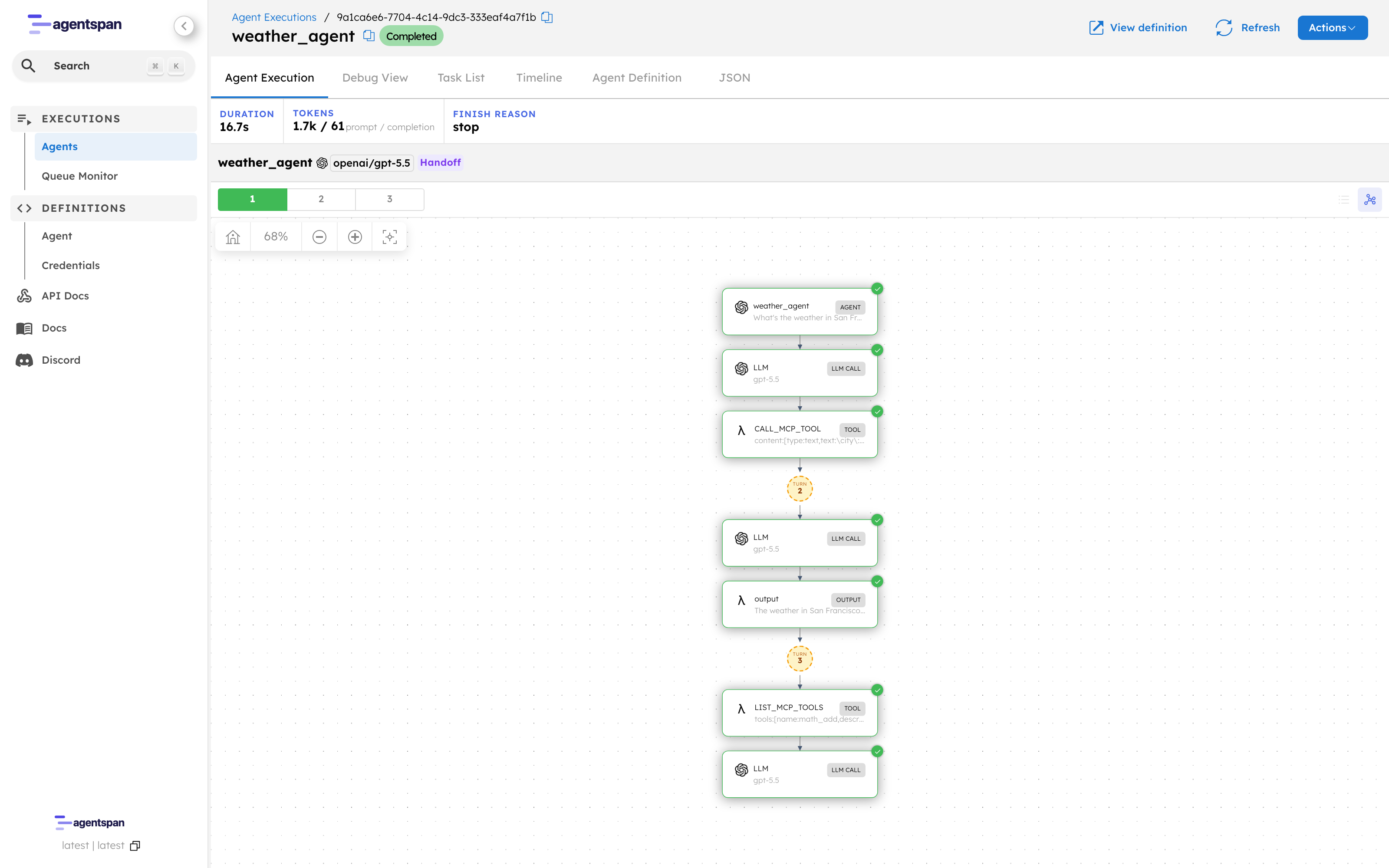
The recorded run: a LIST_MCP_TOOLS step discovers the server’s tools, then CALL_MCP_TOOL runs get_weather. Both execute on the server.
Keep the key out of your code
The test server above accepted anyone. A real MCP server wants a token. Rather than place it in the agent code, store it on the Agentspan server and refer to it by name. Restart the test server with a bearer key, then register that key as a credential:
mcp-testkit --transport http --port 3001 --auth "$WEATHER_KEY"
agentspan credentials set WEATHER_API_KEY "$WEATHER_KEY"
The agent changes by two lines:
weather = mcp_tool(
    server_url="http://localhost:3001/mcp",
    name="weather",
    # ${WEATHER_API_KEY} is filled in on the server at call time.
    headers={"Authorization": "Bearer ${WEATHER_API_KEY}"},
    credentials=["WEATHER_API_KEY"],
)
The ${WEATHER_API_KEY} placeholder is the whole idea. Your code names the credential; it never holds the value. When the agent calls the tool, the Agentspan server substitutes the stored secret into the header and sends the request. The client process and your source never touch it. In the server’s credential store, the values are masked:
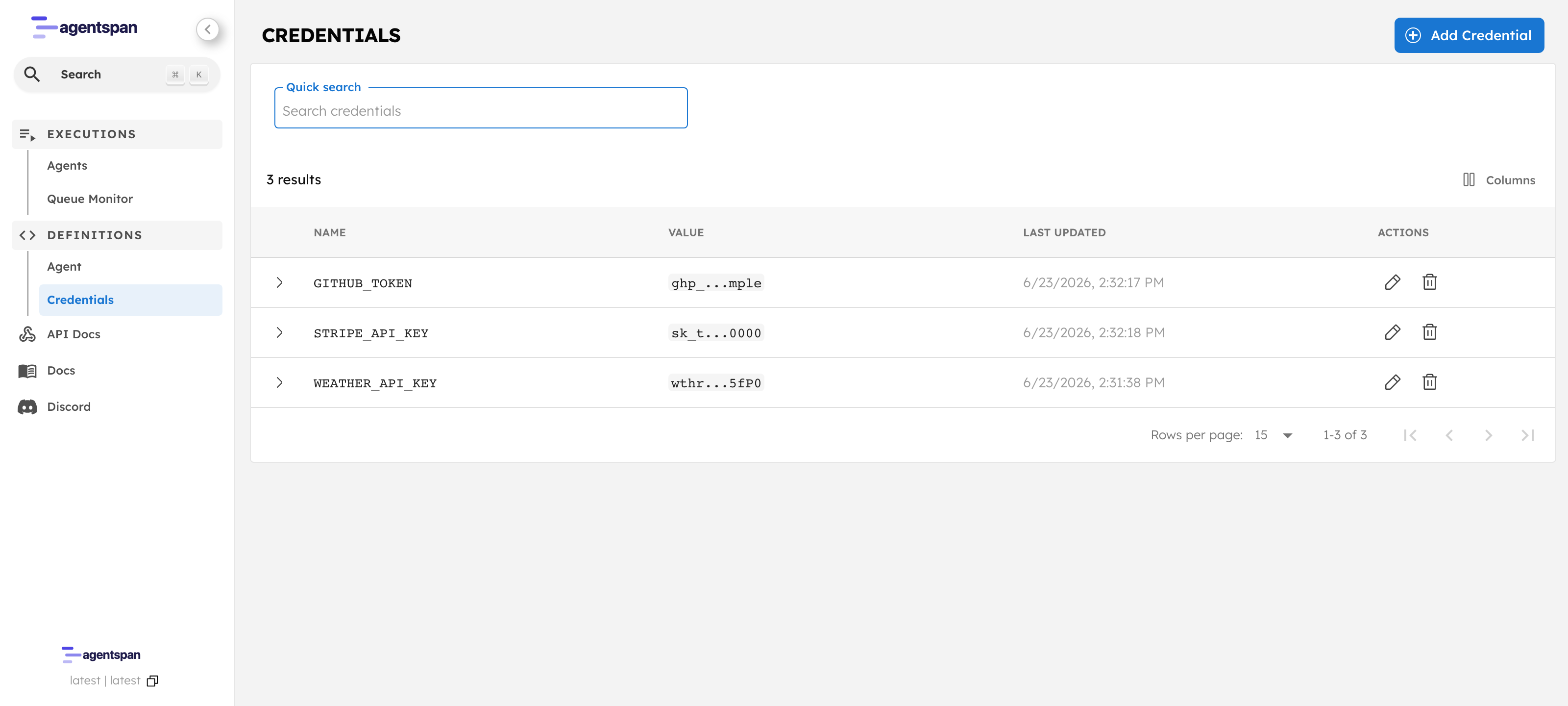
The credential store. The agent code references these by name; the values stay on the server, shown only as a masked preview.
To confirm the server is what authenticates, delete the credential and run the same code:
$ agentspan credentials delete WEATHER_API_KEY

status = FAILED
Failed to list MCP tools from http://localhost:3001/mcp:
HTTP 401 error from MCP server: {"error":"Unauthorized"}
The agent definition did not change. With nothing to inject, the server reaches the MCP endpoint unauthenticated and gets a 401. Access depends on the stored secret, not on anything in the code.
Scope the tools an agent sees
mcp-testkit exposes 65 tools; a weather agent needs one. tool_names and max_tools limit what gets discovered, which keeps the model’s options small and the execution easy to read:
weather = mcp_tool(
    server_url="http://localhost:3001/mcp",
    name="weather",
    headers={"Authorization": "Bearer ${WEATHER_API_KEY}"},
    credentials=["WEATHER_API_KEY"],
    tool_names=["get_weather"],  # one of the server's 65 tools
    max_tools=1,
)
Every call is recorded, and durable
Because the tool calls run on the server, each one belongs to the execution record: the arguments the model sent, the result it got back, the timing, all under one execution id you can open in the UI at localhost:6767. The property that makes those calls visible also makes the run durable. If the process that started it dies, the execution continues and can pause for human approval, which is its own subject in our post on durable agent runs.